20 Nov 2008

GMail Gets Skinned

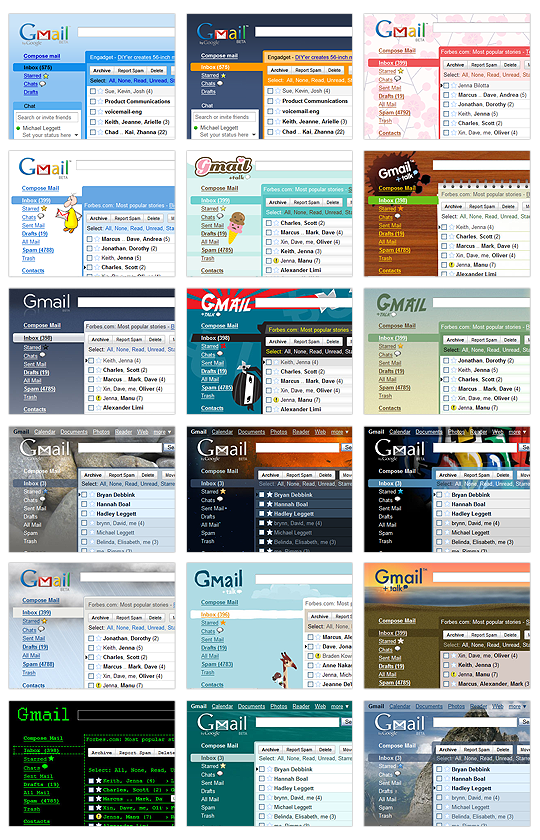
The Official Gmail Blog are reporting that GMail is about to get a major face lift, that is if you want it to. They’re introducing some pretty cool looking skins (30 or so of them apparently) so you can change your Gmail look to suit your needs.

Apparently, you’ll be able to change your themes via the Settings -> Themes tab. I’ve checked by Gmail account and no “Themes” tab yet, but I expect it to appear in the next few days.

Here’s a sample of what you can expect…

GMail Skins Examples

I wonder how long before Google starts offering skins for Google Reader and it’s other offerings.


4 Responses to “GMail Gets Skinned”  

  1. 1 garos

    Ever since these themes have appeared gmail is taking an age to load and move between functions when eventually you get in. I thought it might be a clash with my virus protection, but turning it off made no difference. However, if I select the Older Version, it works fine. The new upgrade would appear to be not for me, which is disappointing. Any suggestions?

  2. 2 Claire

    It has begun….

  3. 3 Colin

    garos: Try using one of the themes at the top of the list in the themes tab. They tend to be less graphic intensive. If you’re using IE, try using something like Firefox 3, Opera or Safari 3: they’re much quicker at handling Javascript and it makes a world of difference.

  4. 4 garos

    Colin, thanks for your reply. I don’t have a themes tab yet, but it comes up with the example in the top left corner above, as some sort of default. It is not simply ’slow’; when I click on an email to open it, it takes 12 - 15 SECONDS to open, then the same amount of time to return to the inbox, or go to any other function. It is driving me crazy. As I said, the only way I have found to over come the problem is to go to the older version and save it to Favourites, because if you simply log in from the Google homepage, as I usually do,the new default version comes up.

    I do use IE7, but have never had a problem with it as far as Gmail is concerned. I wonder if anyone else has had a similar problem?

Get Commenting...

XHTML: If you want to use XHTML tags, please feel free to, but these tags only.